Blog / ATS & Formatting
ATS Resume Format for Freshers: The 2026 India Guide
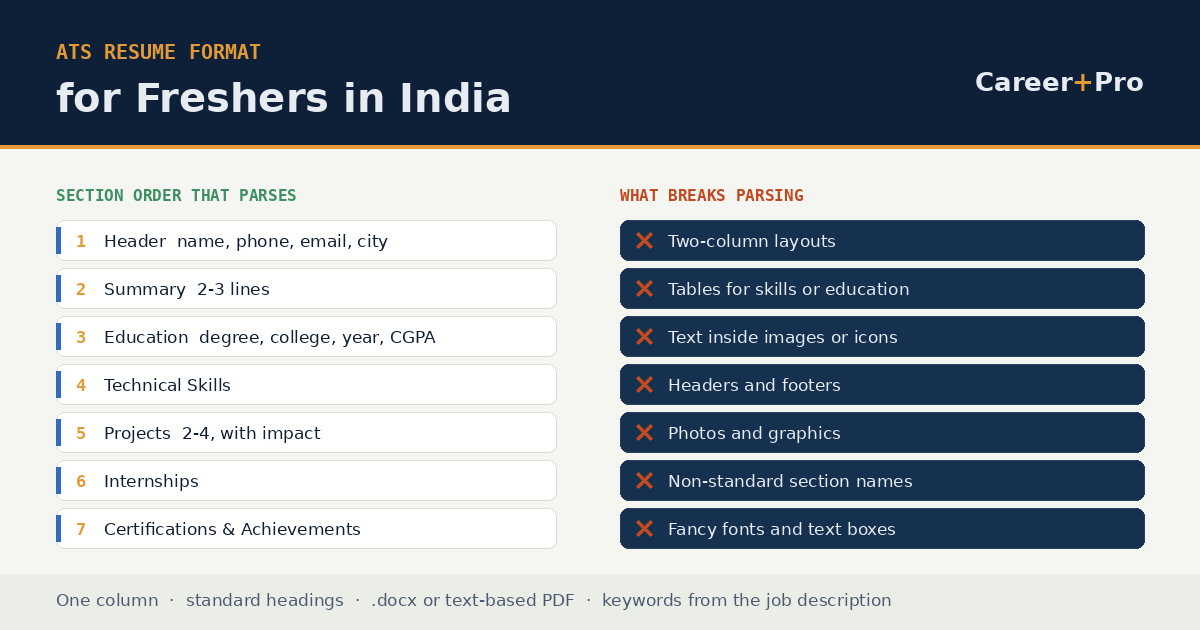
The best ATS resume format for a fresher is a one-page, single-column, reverse-chronological layout using standard section headings, saved as a text-based PDF. Order the sections Header, Summary, Education, Technical Skills, Projects, Internships, then Certifications and Achievements. Skip tables, columns, photos, icons, headers and footers, because those are the elements parsing engines mishandle most often.
That is the whole answer. The rest of this guide explains why each rule exists, because knowing the reason is what lets you make sensible decisions about the cases the rules do not cover.
What an ATS actually does
An applicant tracking system is a database. When you apply through a company careers portal, Naukri, or a link in a job posting, the file you upload is parsed into fields: name, contact details, education, employer, dates, skills. A recruiter then searches that database the way you would search anything else, by typing terms into a box.
Two things follow from that, and almost every real ATS problem traces back to one of them.
First, parsing can fail. If your education sits inside a table cell or a text box, the parser may extract it in the wrong order, attach it to the wrong field, or drop it. Your resume is not rejected; it is stored incorrectly, which produces the same outcome.
Second, search only finds what is written. If the posting asks for SQL and your resume says “database querying”, a recruiter filtering for SQL will not surface your profile. Nothing was rejected here either. You were simply never in the result set.
What an ATS does not do is score your resume out of 100 and bin anything below a threshold. That idea is a marketing invention of the tools that sell you a score. The widely circulated claim that 75 per cent of resumes are auto-rejected by software has no reliable source behind it, and it is worth being sceptical of any guide that leads with it.
The section order that works
For a fresher, education is your strongest credential and it goes above everything else you have done. This ordering is what campus recruiters at the large Indian service companies are used to reading.
| # | Section | What goes in it |
|---|---|---|
| 1 | Header | Full name, phone with +91, a professional email, city, LinkedIn URL, GitHub if relevant. In the body of the document, never in a header or footer. |
| 2 | Summary | Two to three lines: what you studied, the skills you hold, the role you are targeting. |
| 3 | Education | Degree, branch, college, university, year of passing, CGPA or percentage. Most recent first. |
| 4 | Technical Skills | Grouped by type. Languages, frameworks, databases, tools. |
| 5 | Projects | Two to four, each with what it did, what you built, and the stack. |
| 6 | Internships | Company, role, dates, two or three bullets. Omit the section entirely if you have none. |
| 7 | Certifications & Achievements | Course completions, hackathon results, positions of responsibility. |
Use those exact headings. “Education” parses. “Academic Voyage” does not, and it will not be searched for either.
What breaks parsing
These are the formatting choices that cause the most damage, roughly in order of how often they show up in fresher resumes.
| Avoid | Why it breaks | Do this instead |
|---|---|---|
| Two-column layouts | Parsers read left to right across the page, interleaving the two columns into nonsense | Single column, full width |
| Tables for skills or education | Cell content is extracted out of order or attached to the wrong field | Plain lines with a label and a comma-separated list |
| Contact details in a header or footer | Many parsers skip the header and footer region entirely | Put contact details in the first lines of the body |
| Skill bars, rating stars, icons | Graphics carry no text; “Python: 4 stars” extracts as “Python” at best | Write the proficiency in words, or leave it out |
| Photos | Adds nothing machine-readable and consumes a fifth of the page | Remove it for private-sector applications |
| Text inside images or text boxes | Not part of the document text layer, so it is invisible to parsing | Real text in the document body |
| Creative section names | Not matched against expected field labels | Standard headings |
| Uncommon fonts | Substitution can corrupt character extraction | Calibri, Arial, Helvetica, Georgia, Times New Roman, 10–12pt |
All twelve of the templates on this site are single-column and use standard headings for exactly this reason.
PDF or Word?
Send a text-based PDF unless the application explicitly asks for .docx. Both formats parse reliably when the file contains real selectable text.
The failure case is not the extension, it is the text layer. A PDF exported as an image, a scanned printout, or a design file flattened to a picture has no text to extract. The test takes five seconds: open the file, select all, copy, and paste into a plain text editor. If your name and skills come through as readable text in a sensible order, any parser can read it. If you get nothing, or the sections arrive scrambled, fix the document before you send it anywhere.
Picking keywords from the job description
Keywords are not a quota to hit. They are the vocabulary the employer used, mirrored back where it is true.
Take the posting and pull out the required technical skills, the tools named, the qualifications specified and the job title itself. Then check each one against yourself honestly. Where you genuinely have it, use the employer’s exact wording rather than your own synonym, and place it in two locations: the skills section, and the project or internship bullet where you actually used it. A keyword that appears only in a list looks unsupported to a human reader, even when it satisfies a search.
Where you do not have it, leave it out. A fresher who lists Kubernetes because it appeared in the posting will be asked about Kubernetes in the interview, and that conversation is worse than never being shortlisted.
The keyword optimizer does the extraction step for you: paste the job post, and it returns the skills the posting expects, ranked by how prominently they appear.
A full sample layout
This is the structure applied to a B.Tech computer science fresher applying for a software developer role. Adapt the content, keep the shape.
Notice what carries the weight in that sample: the numbers. “480 students”, “14 REST endpoints”, “23 defects”, “about 4 hours a week”. A fresher who quantifies is immediately distinguishable from the several hundred who wrote “worked on a web application project”.
The education section, done properly for India
Indian recruiters read this section closely and expect a specific set of details. Missing any of them creates a follow-up question you will not be present to answer.
- Give the branch, not just the degree. “B.Tech, Electronics and Communication Engineering” rather than “B.Tech”.
- State CGPA and the scale. “CGPA 8.4/10” is complete. “8.4” alone is ambiguous between a 10-point and a 4-point scale.
- Include the year of passing. Campus hiring filters by batch year constantly, so it needs to be visible and parseable.
- Keep Class 10 and 12 while you are a fresher. Many Indian employers still screen on those percentages. Drop them once you have two years of work experience.
- Do not hide a backlog by omitting the section. If you have a pending backlog, state your current status plainly. It gets discovered at verification either way, and volunteering it costs far less than being found out.
Projects are your experience section
With no employment history, projects are the only place a fresher can demonstrate capability rather than assert it. Most fresher resumes waste this section by describing what the project was instead of what the candidate did.
Three lines per project, in this shape:
- What it does, in one line, in plain language.
- What you built, with the technical specifics that show depth.
- What changed as a result, with a number wherever one honestly exists.
“Made a web app using React” tells a recruiter nothing that a thousand other resumes do not. “Designed 14 REST endpoints and a normalised schema across 9 tables” tells them you have actually written the thing. If you are struggling to phrase these, the bullet point generator converts a plain task description into an achievement-first bullet.
Mistakes that show up again and again
| Mistake | Fix |
|---|---|
| “Seeking a challenging role in a reputed organisation” | Replace with a summary naming your degree, skills and target role |
| An email like coolguy_rahul99@example.com | firstname.lastname@example.com |
| Listing every course from the syllabus as a skill | List only what you could be interviewed on |
| Two pages padded with hobbies and declarations | One page. The declaration belongs on a biodata, not a resume |
| Percentages given without the board or year | Board, year and percentage together |
| Same resume sent to every posting | Adjust the summary line and skills order per role |
| Marital status, father’s name and date of birth | Not used in private-sector resumes in India |
Before you send it
- Open the file, select all, copy, paste into a plain text editor. Confirm everything comes through in a sensible order.
- Confirm it is one page.
- Confirm contact details are in the body, not a header or footer.
- Confirm the section headings are the standard ones.
- Confirm every technical skill listed appears in a project or internship bullet too.
- Confirm each project has at least one number in it.
- Name the file Firstname-Lastname-Resume.pdf, not resume_final_v3.pdf.
- Run it against the actual job description in the ATS checker and fix what it flags.
Everything on this site runs in your browser, so none of that involves uploading your resume anywhere. You can build the resume in an ATS-safe template, generate a matching resume headline for your Naukri profile, and check the result against a live posting without creating an account.
Related Reading
- How to beat the ATS: what actually matters
- Resume headline generator for freshers and experienced professionals
- Twelve ATS-safe resume templates
- All articles on the Career Plus Pro blog
Ready to build it?
Build My Resume